Signing in and resetting your password
How to sign in, what to do when you have forgotten your password, how an admin sets a new one, and how long you stay signed in.
4 min read
Signing in
There is no public sign-up into an existing office. Your account exists because an admin added you, or because you joined with a link somebody shared.
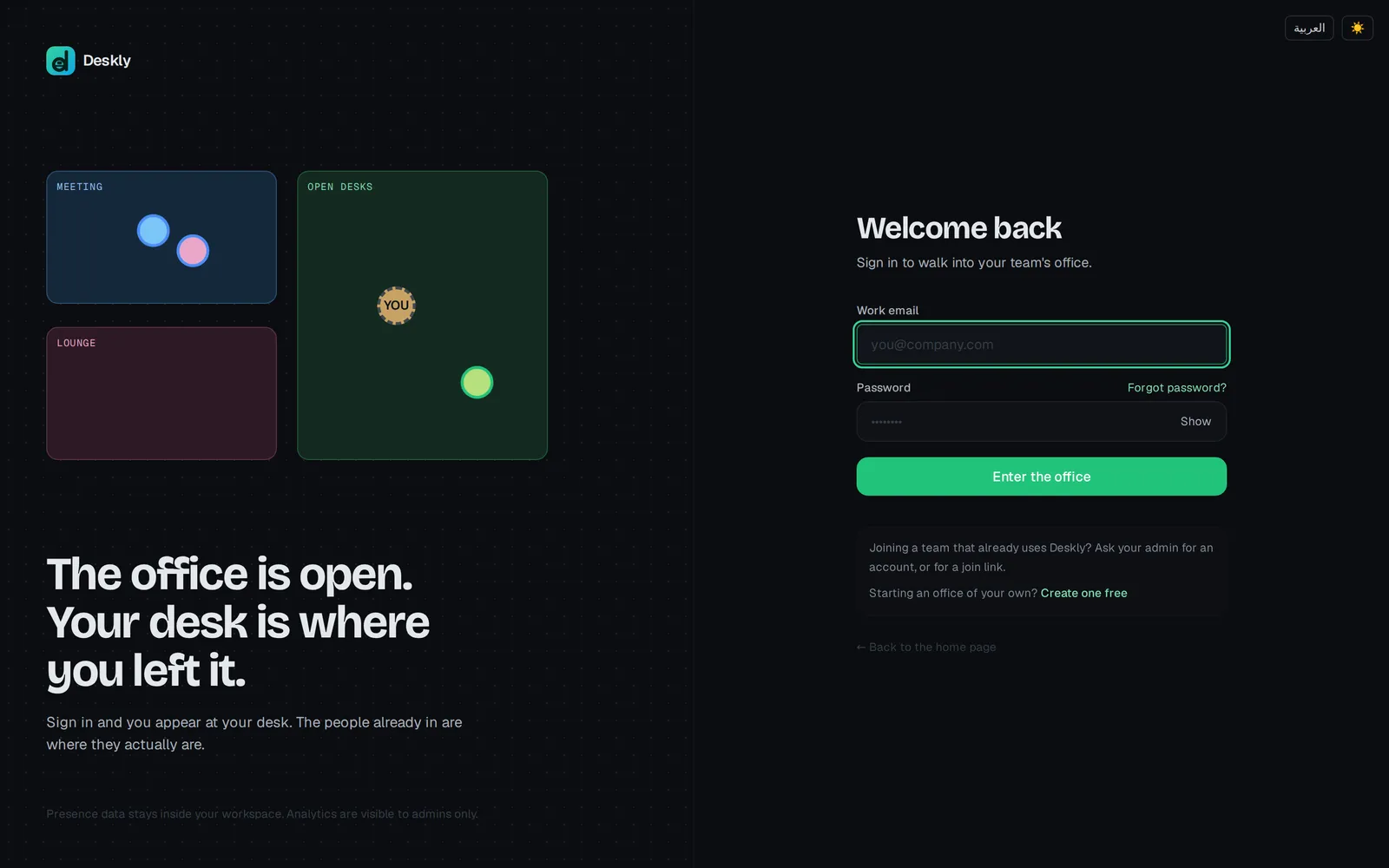
- Open your office's sign-in page.
- Enter your Work email and Password. Show lets you check what you typed.
- Choose Enter the office.
If your office has Google sign-in set up, you also see Continue with Google. It only works for an email address that already has a Deskly account.
If you have forgotten your password
- On the sign-in page, choose Forgot password?.
- Enter your work email and choose Send code.
- Deskly emails you a 6-digit code. It expires in 10 minutes. Type it in and choose Verify code.
- Choose a new password: at least 10 characters, with upper and lower case and a number. Then choose Update password.
Updating your password signs you out on your other devices.
Send a new code cancels the one before it. If two emails arrive, use the newest.
If you created your account with Google, your password is managed by Google. Sign in with Google instead.
When an admin sets a new password
If no code arrives, an admin can set a password for you.
- The admin opens Admin, then People.
- In your row, under Password, they type a New password of at least 8 characters and choose Set.
- They give it to you privately. Deskly does not send it anywhere.
Setting a password this way signs that person out everywhere. An admin cannot change the sign-in details of someone who also belongs to another office - that person resets their own password with Forgot password?.
Changing a password you know
Change it in Settings, under Password:
- Enter your Current password.
- Type the New password twice: at least 10 characters, with upper and lower case and a number.
- Choose Change password.
You stay signed in on this device; every other device you were signed in on is signed out. If you were given a temporary password, change it this way the first time you sign in.
Signed up with Google and never set a password? Sign out, then use Forgot password? to set one.
How long you stay signed in
A sign-in lasts seven days in that browser, then you are asked again. Sign out ends the session on that device straight away.
Common problems
"Wrong email or password". One of the two is wrong, and Deskly does not say which. Check the email first - it is the address your admin used, not necessarily the one you think of as yours.
"Too many sign-in attempts". Sign-in pauses after repeated failures. The message says how many minutes to wait. Resetting your password is the faster way back in.
No code arrived. Look in spam. Deskly sends at most five codes an hour to one account, so asking again and again does not help. If it still does not come, ask an admin to set a password in People. On some self-hosted servers email reset is not set up, and the page says so.
"No workspace here". The address you opened does not belong to any office. Check it, or ask whoever invited you which address to use.
"This page is out of date". Deskly was updated while the page was open. Choose Reload and try again.