Moving around the office and finding people
How to walk, find a colleague, wave or call them, set your status, and change floors.
4 min read
Walking
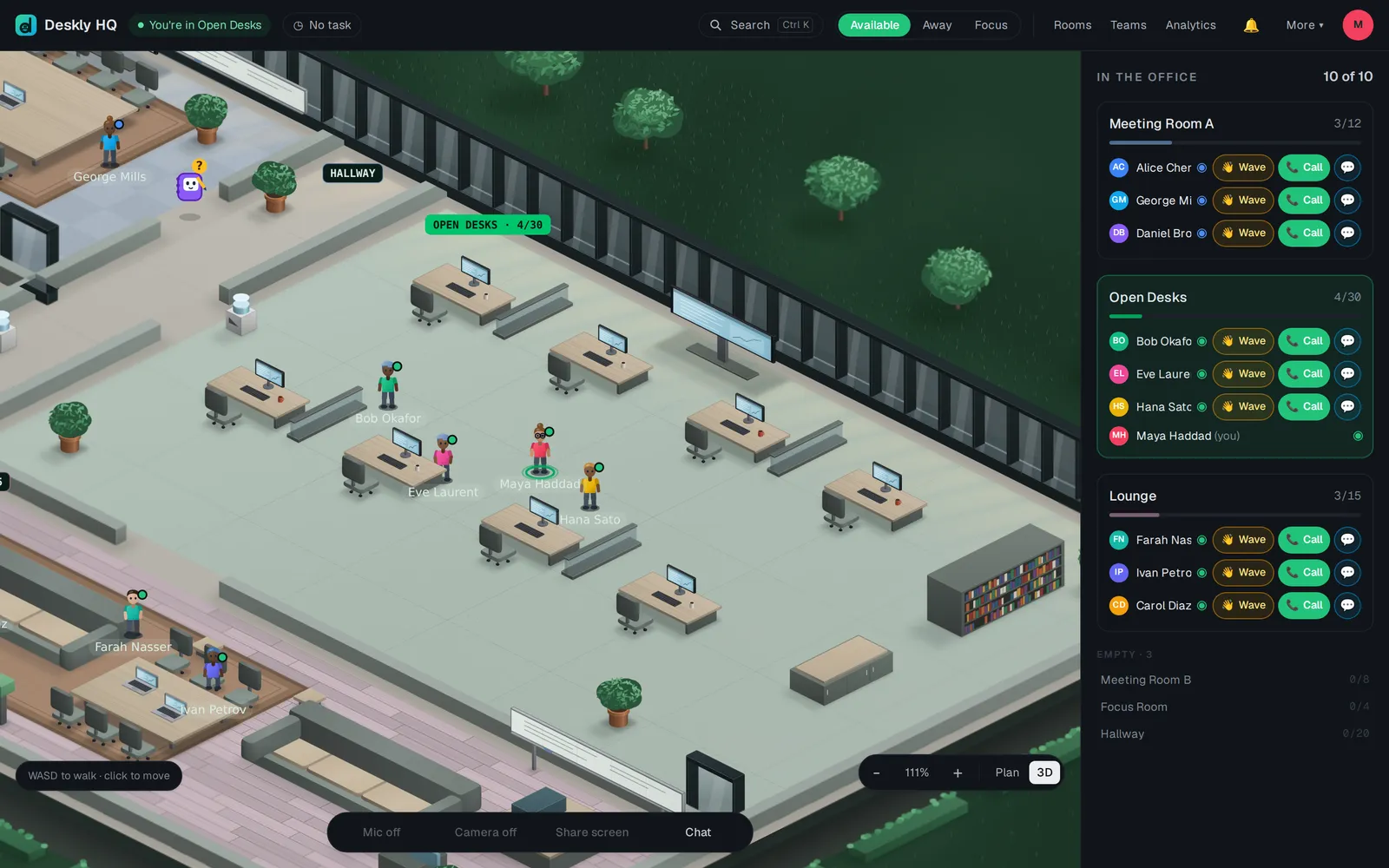
You appear on the floor as an avatar. Where you stand decides who you can hear, so walking is how most things start.
- Use the arrow keys or W A S D to walk.
- Click anywhere on the floor and you walk there by yourself, round the furniture and through the doors.
- On a phone or tablet, use the thumb-stick on screen.
- Zoom with + and - or the scroll wheel. 0 resets the zoom.
- Some objects do something when you walk up to them and press E - a meeting point takes you into its room, and a hotspot shows a note.
New here? More, then Take the tour, walks you through the office in a few steps.
Finding someone
- The roster, In the office, lists every room with people in it, and who is there. Choose a room's name to walk to it. Empty rooms and people who are Not in are listed below.
- Search in the top bar, or Ctrl K (⌘K on a Mac), finds people, rooms, channels and pages. On a person, Walk to them takes you over.
- Rest the mouse on someone's avatar, or click it, to see their card. From there you can Go to them, send a Message, Wave, Call or View profile.
Waving and calling
A Wave is a soft knock before you interrupt. The other person sees "waved at you" with Join them, Wave back and Message. A wave reaches someone on any floor.
A Call rings them. If they choose Answer, you are both moved into a room together: the room you are in if it carries audio, otherwise the emptiest meeting room. When you are already in a room with audio, the card offers Invite instead, which rings them and brings them to you.
Your status
The top bar has three buttons: Available, Away and Focus.
- Focus tells people not to walk in on you. Nobody can call you while it is on - they are told you are not available. Your microphone still works.
- Away turns off your microphone, camera and screen sharing.
- Deskly also sets you Away by itself when your screen locks or your computer reports real idle. If the top bar shows Away detection off, choose it and allow it in the browser. Chrome and Edge support it.
- In a meeting appears on its own when you are in a meeting room with someone else.
Floors
A team is a floor of its own. You only see and hear people on the same floor, and the common area is the floor everyone can enter. If you belong to more than one, the Floor picker in the top bar switches between them.
Common problems
A colleague is missing from the roster. They are probably on another floor. A wave still reaches them.
My call says the person is not available. They are on Focus, or someone else is already ringing them. Send a wave or a message instead.
The keys do not move me. The cursor is in a text box, such as the chat. Click the floor first.
The screen stays on "Reconnecting to the office...". Reload the page once. If it keeps happening, report it from More, then Help & feedback.